- Host
- gw.prokso.com
- Port
- 823 HTTP · 824 SOCKS5 — new IP per request · 10000–20000 sticky session, HTTP(S) and SOCKS5
- Username and password
- in your dashboard, on the plan page
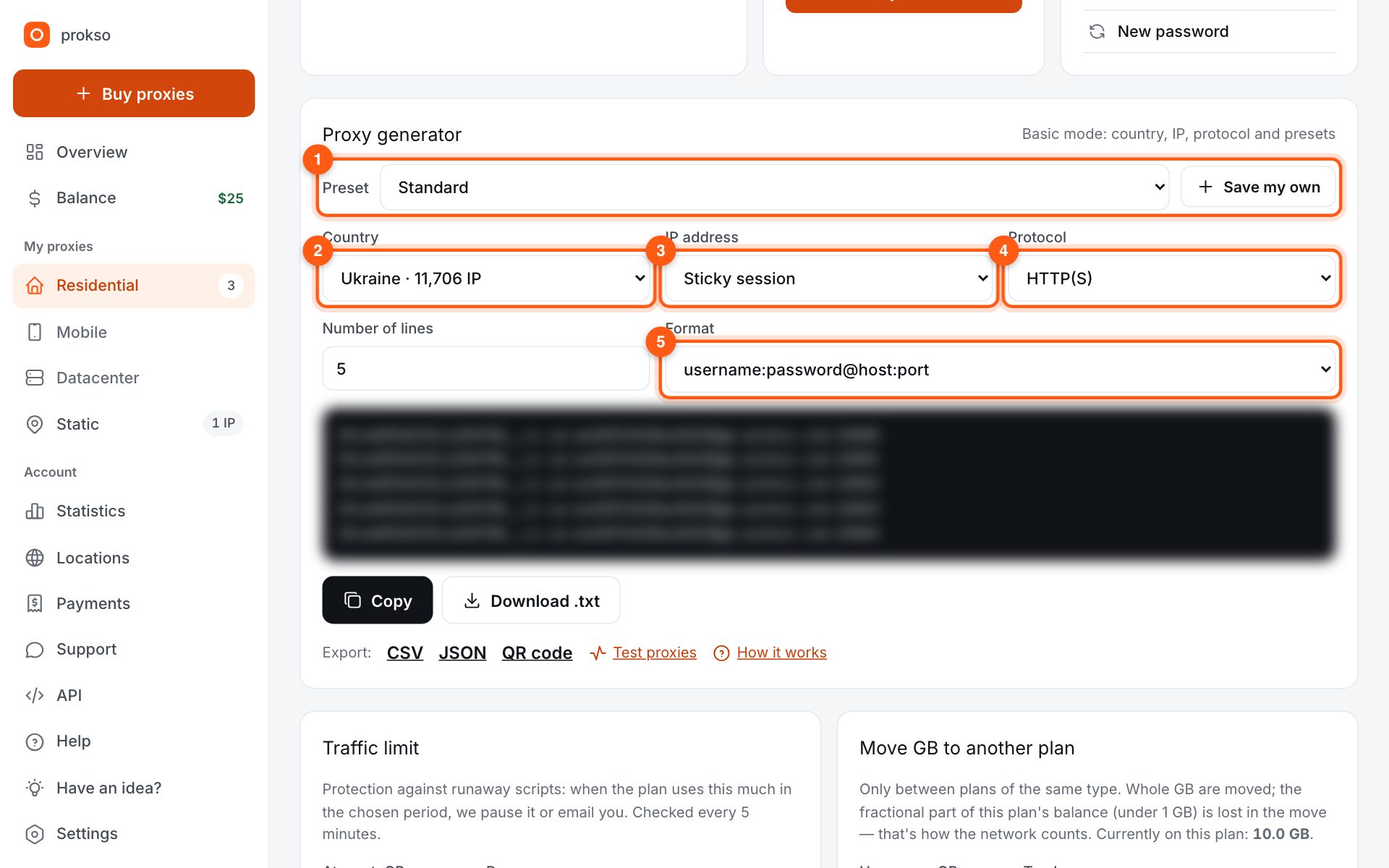
Your dashboard generates ready-made lines in the format you need: choose the country, IP type and protocol.
- Host gw.prokso.com, ports 823 (HTTP), 824 (SOCKS5), 10000–20000 (sticky sessions, HTTP or SOCKS5)
- The username and password are in your dashboard on the plan page
- After setup, check your IP on the My IP page
In Octo Browser proxies live separately from profiles, in the proxy manager. That's handy: you add an address with a name once and then just pick it in a profile. By default Octo sets the language, time zone and geolocation from the external IP every time a profile starts.
Step 1. Decide on names and ports
In the dashboard generator pick a country, “Sticky session” mode, HTTP(S) or SOCKS5 and the host:port:username:password format. Note which port goes to which account: in Octo every proxy gets a name, and “UA 10001” is easier to read than a bare line.
Step 2. Add the proxy to the manager
Open Proxies in the left menu and click Add proxy. Enter a name and the protocol, the same as in the generator.
Step 3. Paste the line into the address field
Click the Enter IP or domain field and paste the line. Octo splits the host, port, username and password by itself. Click Check proxy and, once it passes, Confirm.
Step 4. Pick the proxy in a profile
Create a profile or open an existing one. In the Proxy / VPN field, replace Set proxy / VPN with your proxy from the manager list. If you need the proxy only once, you can paste the line right there as a temporary one.
Step 5. Check the address in the Octo window
Start the profile and open My IP in its window. Compare the IP and country with the generator and look at the WebRTC block: it should show the same IP. Do not check in your regular Chrome: it shows your own connection.
How to run the proxy manager when you have many profiles
The proxy manager in Octo is convenient because proxies and profiles live separately. To make that work for you, stick to one rule: one name is one account. Then, when you replace a string, you change it in one place, and the profile keeps pointing to the same name.
Do not attach one proxy to several profiles with different accounts: they will share an IP.
If Check proxy fails
- The protocol in Octo differs from the one in the generator. For 823 choose HTTP, for 824 choose SOCKS5.
- The string was split into fields incorrectly. Make sure the host field contains
gw.prokso.comand not part of the username. The most reliable format ishost:port:username:password. - The plan has run out of traffic. The remaining traffic is shown on the plan page in your dashboard.
- The port is closed in your network. Test the string in the proxy checker.
When to change the session duration
By default a sticky session keeps one IP for 30 minutes, and the maximum is 120. For a short action such as posting an ad, the default value is enough. For long work inside a site's account area, set the maximum: an IP change in the middle of a session looks to the site like a login from a new location. What a sticky session is, is explained in the glossary.
FAQ
Can I paste a line straight into a profile, without the manager?
Yes, as a temporary proxy in the Proxy / VPN field. For accounts the manager is handier, though: a named proxy is easy to find and move to another profile.
How many profiles can share one port?
Technically any number, but for accounts give every profile its own 10000–20000 port. Otherwise the site sees several accounts on one IP.
Check proxy fails. Why?
Most often the protocol is wrong: 823 works only as HTTP and 824 only as SOCKS5. Also check that the plan isn't paused and that the username and password have no spaces.
After I changed the proxy country, the site asks me to log in again. Why?
The site sees a new address and a new country and plays it safe. This is the site's behavior, not a proxy error. To avoid it, do not change an account's country unless you have to.
Can I use rotation on every request in Octo?
You can, and that is exactly what ports 823 and 824 are for. But for a profile with an account it is a poor choice: every page will load from a new IP.