How to top up your balance
A balance is handy when you buy traffic often: top up once, then pay for plans in one click with no new transfers.
1. Choose the amount and payment method
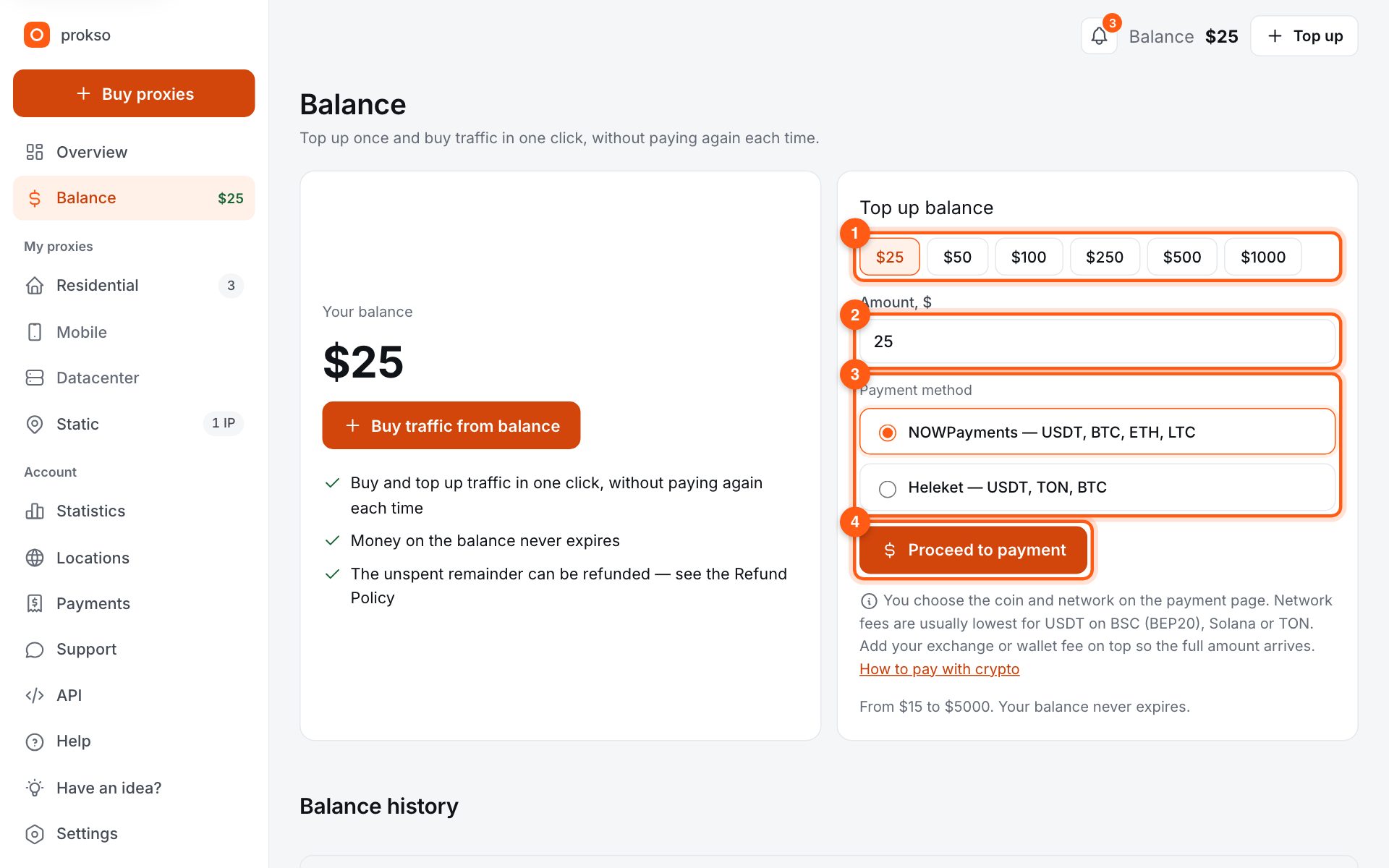
Open “Balance” in the menu. Click a preset amount (1) or type your own (2). Below, choose the payment method (3) if there are several: all accept crypto, the list of coins differs. Click “Proceed to payment” (4).
2. Pay on the gateway page
The payment service page opens. Choose the coin and network, copy the address and amount, and send the transfer from your wallet or exchange. Network fees are usually lowest for USDT on BSC (BEP20), Solana or TON.
Important: send exactly the amount shown, or slightly more. If an exchange takes its fee out of the transfer, less arrives and the payment hangs as partial.
3. Wait for the credit
The money appears on your balance automatically once the network confirms it — usually within a few minutes. You can close the page; crediting does not depend on it. Every operation is listed under “Balance history” further down the same page.
4. What next
Money on the balance does not expire. You can use it to buy a new plan or add gigabytes to an existing one — see the next guide.