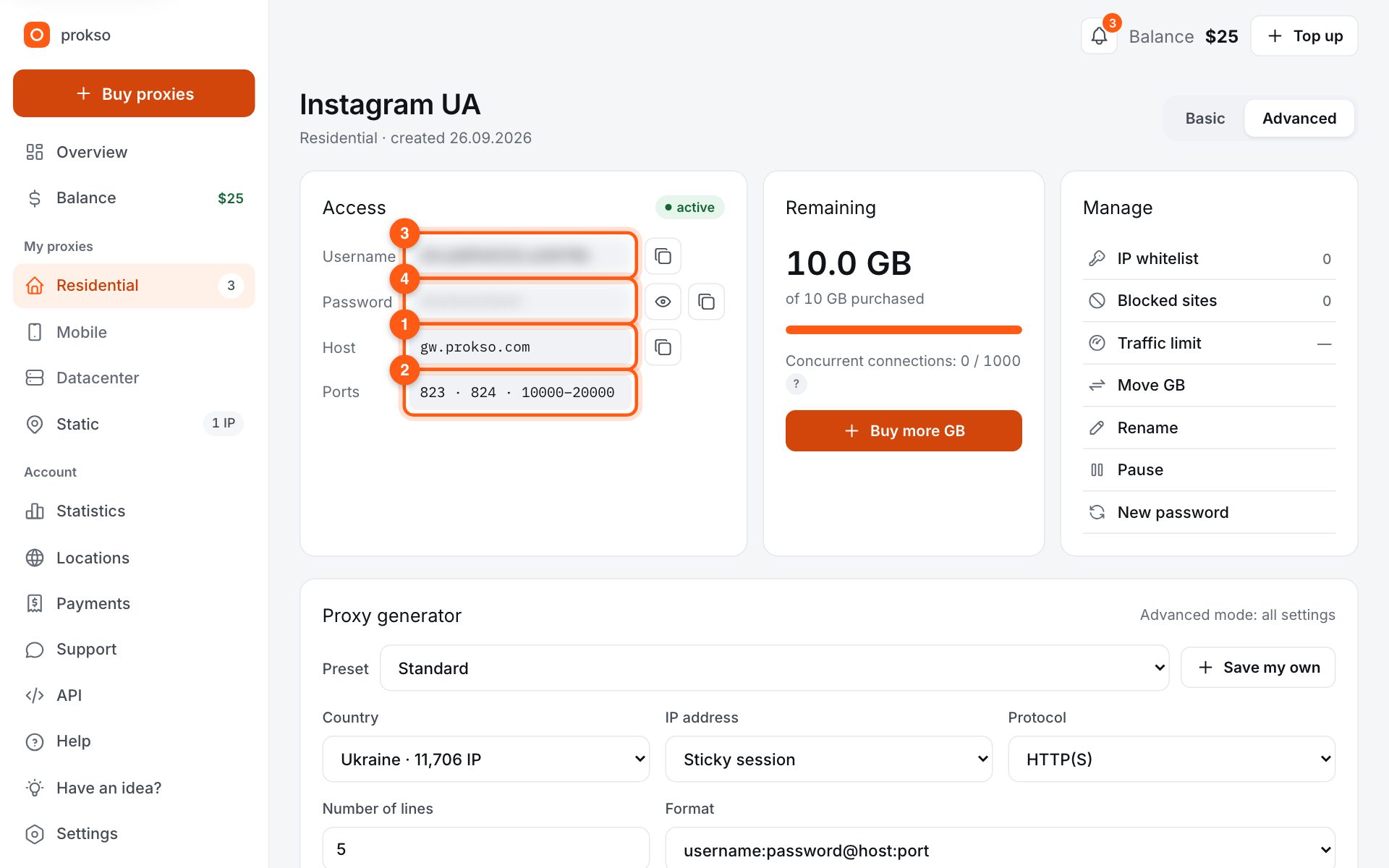
- Host
- gw.prokso.com
- Port
- 823 HTTP · 824 SOCKS5 — new IP per request · 10000–20000 sticky session, HTTP(S) and SOCKS5
- Username and password
- in your dashboard, on the plan page
Your dashboard generates ready-made lines in the format you need: choose the country, IP type and protocol.
- Host gw.prokso.com, ports 823 (HTTP), 824 (SOCKS5), 10000–20000 (sticky sessions, HTTP or SOCKS5)
- The username and password are in your dashboard on the plan page
- After setup, check your IP on the My IP page
A step-by-step guide to connecting Prokso proxies in WhatsApp. It takes a few minutes.
Step 1. Get the proxy details from your dashboard
Open your plan and copy the host gw.prokso.com, port, username and password. Port 823 is HTTP and 824 is SOCKS5 (both give a new IP for every request); ports 10000–20000 keep one IP (sticky session) for up to 120 minutes and work as both HTTP and SOCKS5 (each port is a separate address). Set the country in the username: username__cr.ua.
Step 2. Why not WhatsApp's built-in proxy
WhatsApp has Settings → Storage and data → Proxy, but it's meant for special WhatsApp relay servers: it only takes an address and port, with no username or password fields. A regular HTTP or SOCKS5 proxy with authentication can't be used there, so you set the proxy for the whole phone instead.
Step 3. Install a proxy client
Install an app that routes the phone's traffic through SOCKS5 with a username and password (on Android and iPhone these apps create a local VPN profile). Add a SOCKS5 server: host gw.prokso.com, a sticky port from 10000–20000, and the username and password from your plan page.
Step 4. Turn it on
Start the proxy in the app and allow it to create the VPN profile. If the app supports per-app routing, you can send only WhatsApp through the proxy and let everything else go direct.
Step 5. Open WhatsApp
Fully close WhatsApp and open it again so it connects through the proxy. Keep WhatsApp's own Proxy option turned off.
Step 6. Check the connection
The proxy client should show it's connected, and the phone should show the VPN icon. Send a message: if it's delivered (two ticks), WhatsApp works through the proxy. If the client routes the whole phone, also open My IP in the phone's browser — it should show the proxy's IP.
What exactly will go through the proxy
The proxy client creates a local VPN profile and by default sends the traffic of all the apps on the phone through the proxy. Updates, photo syncing, and background requests will start spending your plan's traffic. If the client lets you choose apps, leave only WhatsApp in the list.
Messages and media files go through the proxy. Calls use separate connections, and you should not count on them working through the proxy.
If WhatsApp does not connect
- The built-in "Proxy" item in WhatsApp is turned on. It is designed for other servers. Turn it off.
- Something other than SOCKS5 is selected in the client. Check the server type.
- Port 823. That is an HTTP port. For SOCKS5, take a sticky port in the 10000-20000 range.
- Another VPN is running. Only one VPN profile can be active on a phone.
- The plan has run out of traffic. The remaining traffic is shown in your dashboard.
How much traffic you need
Text messages weigh almost nothing. The main usage is photos, video, and voice messages, as well as chat backups. While you work through the proxy, turn off media auto-download and backups in the WhatsApp settings.
FAQ
Won't the Wi-Fi proxy setting do?
On iPhone the manual Wi-Fi proxy supports a username and password, on Android it doesn't (only host and port, so you'd need the IP whitelist). But WhatsApp doesn't have to use the system HTTP proxy and may connect directly, so a proxy client with a VPN profile is more reliable.
Do calls work through the proxy?
No. Our proxies carry TCP traffic only, and WhatsApp calls use UDP. Messages, photos and voice notes work, but calls either won't connect or will go direct, depending on the proxy client.
Does this work with WhatsApp Business?
Yes, the steps are the same: the app goes online through the same proxy client.
How do I connect WhatsApp Web through a proxy?
WhatsApp Web opens in a browser, so the proxy is set up in the browser or in an antidetect profile. This does not affect the app on the phone.