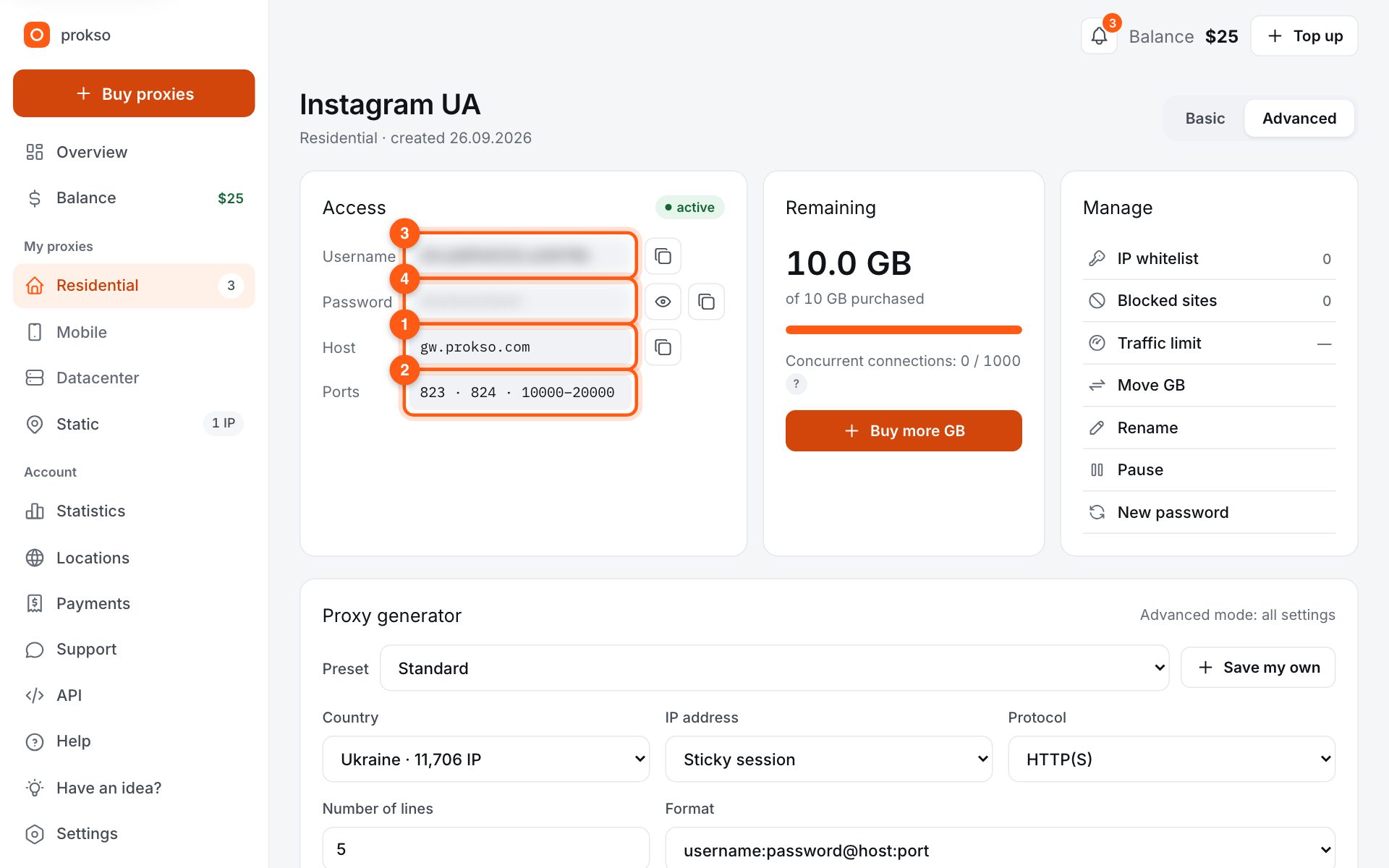
- Host
- gw.prokso.com
- Port
- 823 HTTP · 824 SOCKS5 — new IP per request · 10000–20000 sticky session, HTTP(S) and SOCKS5
- Username and password
- in your dashboard, on the plan page
Your dashboard generates ready-made lines in the format you need: choose the country, IP type and protocol.
- Host gw.prokso.com, ports 823 (HTTP), 824 (SOCKS5), 10000–20000 (sticky sessions, HTTP or SOCKS5)
- The username and password are in your dashboard on the plan page
- After setup, check your IP on the My IP page
A step-by-step guide to connecting Prokso proxies in Proxifier. It takes a few minutes.
Step 1. Get the proxy details from your dashboard
Open your plan and copy the host gw.prokso.com, port, username and password. Port 823 is HTTP and 824 is SOCKS5 (both give a new IP for every request); ports 10000–20000 keep one IP (sticky session) for up to 120 minutes and work as both HTTP and SOCKS5 (each port is a separate address). Set the country in the username: username__cr.ua.
Step 2. Add a proxy server
In Proxifier open Profile → Proxy Servers → Add. Address gw.prokso.com, type SOCKS5 or HTTPS. For account work use a sticky port from 10000–20000 (one IP, works with both types); 824 (SOCKS5) and 823 (HTTP) give a new IP for every request.
Step 3. Turn on authentication
Tick Enable authentication and enter the username and password from your dashboard. Click Check — Proxifier tests the connection.
Step 4. Set up rules
Open Profile → Proxification Rules. To route the whole system through the proxy, pick the server in the Default rule. For specific apps only, create a new rule and add their .exe files.
Step 5. Keep local addresses direct
Make sure the Localhost rule is set to Direct, otherwise local services may stop working.
Step 6. Check in the right app
Check in the app the rule applies to. Start it: the connections list in the Proxifier window shows which rule and proxy each connection uses. If the rule covers a browser, open My IP in it — you should see the proxy's IP and country. Another browser without a rule will show your own IP, which is expected.
When you need Proxifier
Proxifier intercepts program connections and sends them through the proxy, even if the program itself does not support proxies. You need it in three cases: the program cannot work with a proxy, you need SOCKS5 with a username and password for the whole system, or different programs must go through different addresses.
The order of rules
Proxifier checks the rules from top to bottom and applies the first one that matches. A rule for a specific program must be placed above a general one. The "Default" rule at the very bottom defines what to do with everything else: "Direct" means directly, and your proxy means through it.
If you need to send one program through the proxy, leave "Default" on "Direct" and add one rule with its file. That way only this program spends your plan's traffic.
If a program does not go through the proxy
- The rule does not fire. The connections window shows which rule was applied. If it says "Default", the program's file name in the rule is wrong.
- The program starts another process. The connections are opened by a different file from the one you specified. Look up the real name in the connections window and add it to the rule.
- Names are resolved bypassing the proxy. In the "Name Resolution" section, turn on name resolution through the proxy, otherwise DNS requests go out directly.
- The "Check" test fails. Verify the type and port: 824 is SOCKS5 only, 823 is HTTP only, and sticky ports accept both types.
- The program uses UDP. Only TCP goes through the proxy.
FAQ
SOCKS5 or HTTPS?
SOCKS5 works for any app, including non-browser ones; HTTPS is enough for websites. Port: a sticky 10000–20000 port for one IP (works with both types), or 824/823 if the IP may change on every request.
Can I set different proxies for different programs?
Yes. Add several servers in "Proxy Servers" and create a rule per program, selecting its own server in each one.
Does Proxifier work on a Mac?
Yes, there is a version for macOS. The option names are the same, and in the rules you specify an application instead of an .exe file.
How do I turn the proxy off temporarily without deleting the settings?
Set the "Default" rule to "Direct" and clear the checkboxes for the other rules. The server and the rules will stay in place.