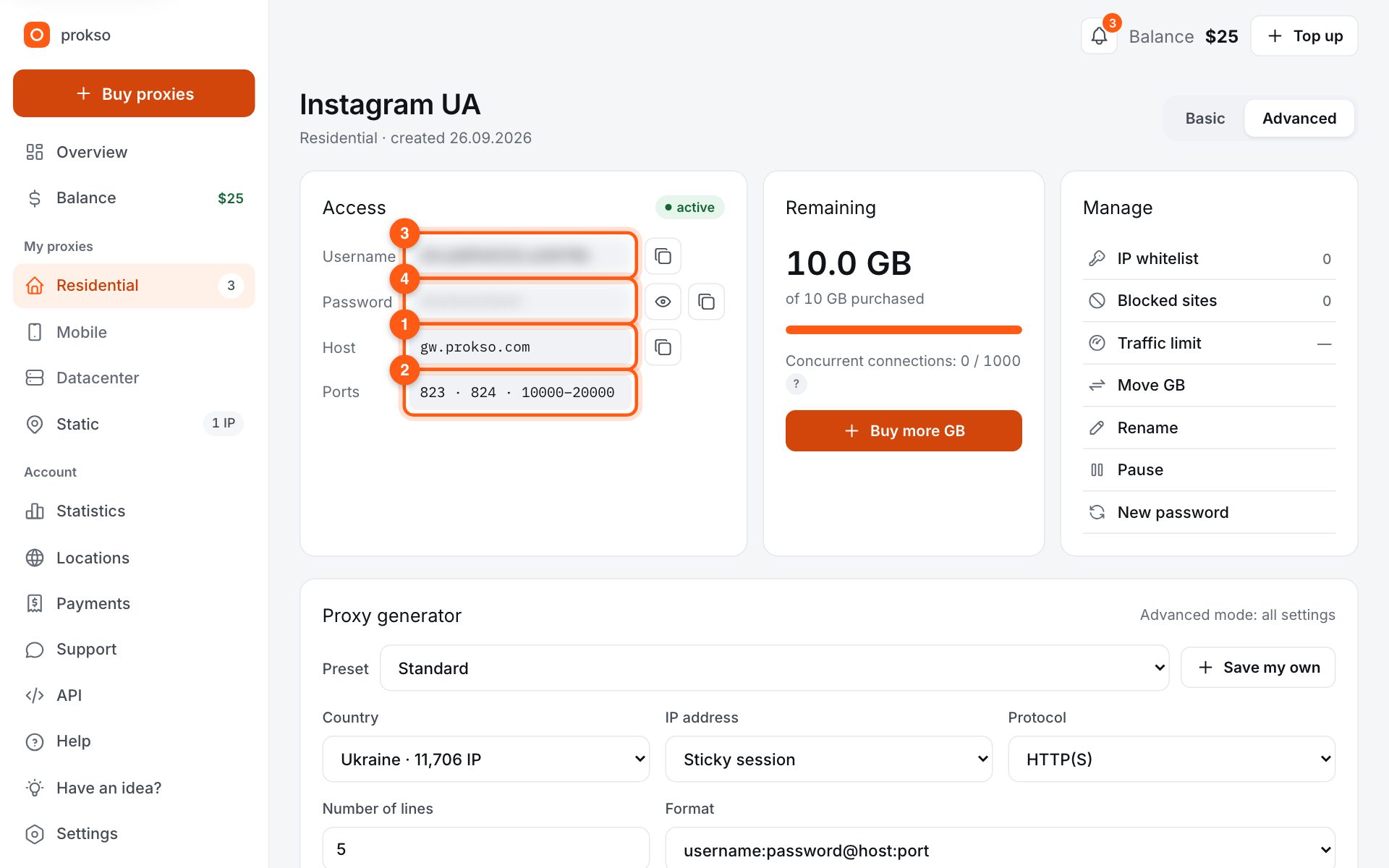
- Host
- gw.prokso.com
- Port
- 823 HTTP · 824 SOCKS5 — new IP per request · 10000–20000 sticky session, HTTP(S) and SOCKS5
- Username and password
- in your dashboard, on the plan page
Your dashboard generates ready-made lines in the format you need: choose the country, IP type and protocol.
- Host gw.prokso.com, ports 823 (HTTP), 824 (SOCKS5), 10000–20000 (sticky sessions, HTTP or SOCKS5)
- The username and password are in your dashboard on the plan page
- Check the IP in the response of the proxied request itself: the My IP page in a browser does not test your script
A step-by-step guide to connecting Prokso proxies in Python requests. It takes a few minutes.
Step 1. Get the proxy details from your dashboard
Open your plan and copy the host gw.prokso.com, port, username and password. Port 823 is HTTP and 824 is SOCKS5 (both give a new IP for every request); ports 10000–20000 keep one IP (sticky session) for up to 120 minutes and work as both HTTP and SOCKS5 (each port is a separate address). Set the country in the username: username__cr.ua.
Step 2. Install the library
You need Python 3 and the requests library: pip install requests. For SOCKS5: pip install "requests[socks]".
Step 3. Pass the proxy to the request
Put the proxy in the proxies dict for http and https. The code below prints the IP the website sees.
import requests

proxy = "http://USERNAME:PASSWORD@gw.prokso.com:823"
proxies = {"http": proxy, "https": proxy}

r = requests.get("https://api.ipify.org?format=json", proxies=proxies, timeout=30)
print(r.json())
Step 4. SOCKS5 and a sticky session
For SOCKS5 change the scheme to socks5h:// and the port to 824. To send several requests from one IP, use a port from 10000–20000 instead of 823 or 824 — it works with both http:// and socks5h://.
# pip install "requests[socks]"
proxy = "socks5h://USERNAME:PASSWORD@gw.prokso.com:824"   # socks5h — DNS through the proxy too
Step 5. Check the script output
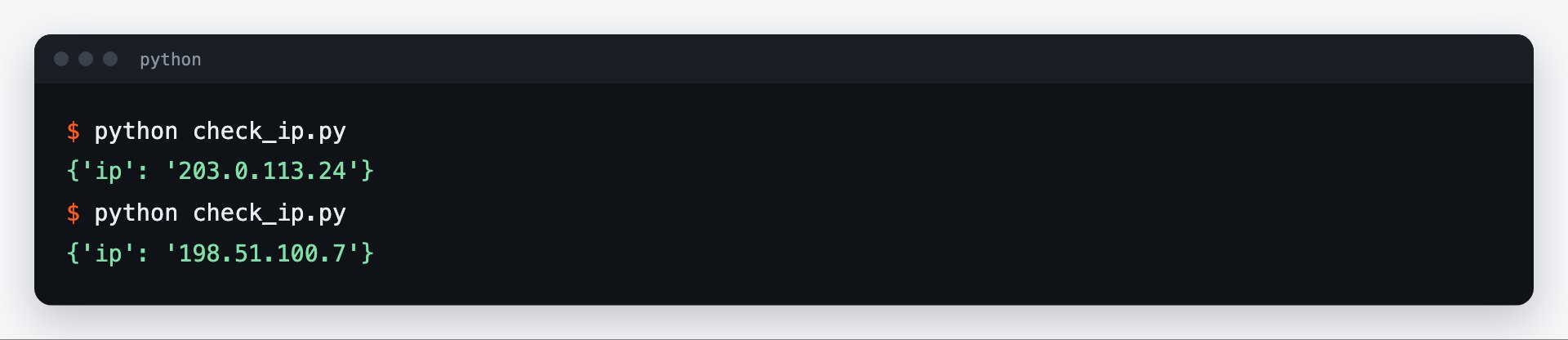
Run the code from step 3: it requests https://api.ipify.org through the proxy and prints {"ip": "…"} — the address the website sees. It should differ from yours. Run it twice: on 823 the IP changes, on a sticky port it stays the same. The My IP page in your browser won't help here, as the browser doesn't use this proxy.
Session, timeouts, and retries
For a series of requests, create a requests.Session() and set the proxy once: a session reuses connections and runs noticeably faster. Always set a timeout: without one, a hung request will stop your script forever. Through residential and mobile addresses a response takes longer than it does directly, so 30 seconds is a reasonable starting point.
import requests
from requests.adapters import HTTPAdapter
from urllib3.util.retry import Retry

proxy = "http://USERNAME:PASSWORD@gw.prokso.com:823"

s = requests.Session()
s.proxies = {"http": proxy, "https": proxy}
# retry only temporary failures, with a growing pause
retry = Retry(total=3, backoff_factor=1, status_forcelist=[502, 503, 504])
s.mount("http://", HTTPAdapter(max_retries=retry))
s.mount("https://", HTTPAdapter(max_retries=retry))

r = s.get("https://prokso.com/ip", timeout=30)
print(r.status_code, r.text)
Only temporary failures are worth retrying: 502, 503, 504, and timeouts. On port 823 every retry goes out from a new IP. Codes 403 and 429 come from the site: an immediate retry will not fix them and will only spend traffic.
What the errors mean
- ProxyError with code 407. The proxy did not accept the username or password. Check the string and the remaining traffic on your plan.
- ConnectTimeout. The script could not reach the proxy: check the host and port, and whether the port is blocked on your network.
- ReadTimeout. The proxy is reachable, but the site did not respond in time. Increase the timeout or retry the request.
- Missing dependencies for SOCKS support. The package for SOCKS is not installed: run
pip install "requests[socks]".
The response codes are explained on the proxy error codes page.
How to spend less traffic
Traffic is counted by the size of the responses. Request data through the site's API if it has one: JSON is several times lighter than an HTML page. Do not download again what you already have, and do not load images if you only need the text. The traffic calculator will help you estimate the volume in advance.
FAQ
How do I run many threads?
Use concurrent.futures or asyncio with aiohttp. Every thread can use the same port 823 — each gets a different IP.
Why does requests go through a proxy when I did not set one?
The library reads the <code>HTTP_PROXY</code> and <code>HTTPS_PROXY</code> environment variables. To turn this off, set <code>trust_env = False</code> on the session.
How do I encode special characters in the password?
Pass the username and password through <code>urllib.parse.quote(..., safe="")</code> before you build the proxy address. Otherwise the <code>@</code> and <code>:</code> characters will break the parsing of the address.
How do I set the country in code?
The country is written in the username, for example <code>USERNAME__cr.de</code>. Change the username: the address and port stay the same.